As World Language teachers, part of our responsibility is to educate others about the benefits of learning a second language. I have a Pinterest board on which I store articles about language learning and developing proficiency. I imagine that the majority of language teachers have read similar articles. But, what have we done to share that information with the population outside of the World Language teaching profession?
This week we had our second Back-To-School Night because students started a new semester and new classes in January. This is also the time of year when students, and their parents, are scheduling their courses for the next school year.
To promote our program and educate others about the benefits of learning a second language, I decided to create a display on the bulletin board in our hallway. First I contacted students that have graduated from our school and asked them to send me a statement in what ways they have already benefited from being able to communicate in Spanish, whether it is in college, a job they have while going through college, travel experiences, or how they are using Spanish in their career since graduating from college. My Spanish 5 students also wanted to contribute, so on a small white marker board, they explained why they have continued through level 5. Then I took photos of them holding their whiteboards and added those photos to the bulletin board.
I could have added more information and statistics, but this time I focused on individuals and the benefits each of them has experienced. Do you have any ideas for something I could add to the present board?
Reading, Storytelling, and Ideas for Technology use in the Target Language.
Thursday, February 19, 2015
Tuesday, February 17, 2015
Sketches with High Frequency Words in the Past Tense
I wanted to recycle the new words (había-there was, quería-s/he wanted, fue-s/he went, and estaba-s/he was) from last week, and introduce a few new words: se llamaba - his/her name was; no tenía=s/he didn't have; and, (no) encontró = s/he found/didn't find.
1. I greeted the students at the door and gave them a quarter slip of paper. The instructions on the board told them to number the paper 1-4 and write the following:
1- the name of a person
2- what someone wanted
3- a place
4- an emotion
When finished, the students put the papers in a basket.
2. We read the story we created last week about the person in the movie theater, (see this post), to review. Then I distributed several short stories from previous years with the above words and we read them together. We also watched a short story that I had made into a video with Educreations using the same words.
3. I projected a paper with 9 squares onto the board. Then I randomly pulled a paper out of the basket to find a name of the person. (There was a boy whose names was Elmo) and I sketched a person in the first square. Then I pulled another paper to find what the person wanted. (Elmo wanted a dog. He had a cat and two rabbits but he didn't have a dog.) The extra information about the animals that Elmo did have are another opportunity for more comprehensible input and reps.
4. I continued the above to find TO WHERE the person went. Students told me if the person found or didn't find the item (if the person found it I circled it and if the person didn't find it I put an X over the sketch). The final frame shows how the person felt. To find the emotion, I pulled another paper and used the emotion that was listed.
This was an easy way to provide repetitions and model the activity. It kept the students' attention because they didn't know if I would pick their paper, and they wanted to see if I could somewhat sketch something that resembled the information on the slips of paper.
5. To change the pace, I then gave each student a half sheet of paper with 3 boxes. They had to sketch a person, what the person wanted, to where the person went, indicate with a circle or X if the person found the item, and sketch the person's emotion in the last square.
6. Students put their sketches in a basket and then I assigned a student to randomly choose the sketches. We put them under a document camera and created the story together. I said most of the story but paused and pointed to the sketch for them to supply the necessary word(s).
Example - the underlined words are what I pointed to and students gave the answers:
1st square: Había un chico que se llamaba Antonio. Antonio quería unas hamburguesas. No tenía hamburguesas en su casa. Tenía helado y tenía avocados pero no tenía hamburguesas.
2nd square: Antonio fue al supermercado. Pero no había hamburguesas en el supermercado. Había pescado y había chicle, pero no había hamburguesas. Antonio no encontró hamburguesas en el supermercado.
3rd square: Antonio estaba triste porque quería unas hamburguesas pero no las encontró en el supermercado.
Tomorrow we'll continue with more of the student sketches. When we find a sketch that all the students seem particularly interested in, I'll use that one to create a full story.
With only a few words, there are a lot of stories that are waiting to be created .
Monday, February 16, 2015
Storyline with Gerunds and Prepositions of Place
Most of my students have learned the basic prepositions of place in Spanish 1, so this story, that I use in Spanish 2, reviews those prepositions as well as allows for several repetitions of gerunds.
The storyline is about a person that went to the movie theater. It was crowded and there was only one empty seat. He sat down and started watching the movie, but there were many distractions throughout the movie.
Ask the students to give suggestions for what the people to the left of, to the right of, in front of, and behind the person were doing. Some of the ideas from my students last week were:
- la persona detrás de él estaba pateando su silla
(was kicking his seat)
- la persona delante de él estaba tócandose su bigote largo
(was touching his long moustache)
- la persona a la izquierda de él estaba llorando
(was crying)
- la persona a la derecha de él estaba durmiendo (y estaba roncando)
(was sleeping and was snoring)
After we worked with this story, we watched episode #3 of BBC's Mi Vida Loca which just happens to be the episode in which Merche gives directions. (When I use series such as that, my goal is always to do more than have the student simply watch it. We have a limited number of hours with the students and we need to be good stewards of that time, always striving to follow best practices and most effectively use the time we have in class.) Also, because Friday was one day before Valentine's Day, we ended the class watching Sr. Wooly's song "Billy y las botas", a love story, of course, between Billy and las botas, which has the lyrics "estaba caminando" and "estaba nevando". It's almost as if I planned that.
In previous semesters I had students act out the actions, but I didn't do that this time. I have to admit, there was something missing without the actors. My suggestion, add the actors whenever possible!
One last note:
Shout out to @nellyhug (Nelly Hughes) for feedback at a moment's notice. :-)
Saturday, February 7, 2015
Student Artists + Notability App = More CI Reps
I am guilty of not utilizing student artists in my class as I should. However, this semester I am hoping to change that. This week I remembered to ask a student to sketch the story as we were creating a story resulting in the following:
I had the students use my iPad and the Notability app. I used to have students use the Educreations app for sketches, but Notability is more user friendly, both when sketching and when moving the sketches to paper.
Providing students the opportunity to contribute to the class with their sketches has several advantages:
1. The student artist, and many times, the students seated near the artist, are undeniably focused on the story because the artist is charged with sketching the details as we develop the story, requiring him/her to pay close attention and neighboring students to provide help when needed.
2. After the class story is completed, I project the sketches and I retell the story and circle the information and the answers. The students are interested in seeing their classmate's artwork so they're focused on the story once again.
3. After class, it's easy to transfer the sketches to paper. I make copies for the students and give it to them the following day for additional review.
(4) This is another opportunity to showcase the students' artistic talents.
Reps, reps, and more reps.
Additional ideas for the copies of the storyboard sketches:
- Students use the sketches to retell the story.
- Cut the paper so there is one sketch on each square of paper. Place the sketches face down. Turn them over one at a time, telling the part of the picture that relates to the sketch. Put in order as sketches are turned over.
- Chose X number of sketches and create a NEW story using the target structures for the original story.
- Teacher says a statement and students point to the sketch it describes.
Both of the stories above follow the storyline of the story I wrote before the class. The structures are the same as my story, but the students' story has different details. You can access the story HERE in present and past tense.
Providing students the opportunity to contribute to the class with their sketches has several advantages:
1. The student artist, and many times, the students seated near the artist, are undeniably focused on the story because the artist is charged with sketching the details as we develop the story, requiring him/her to pay close attention and neighboring students to provide help when needed.
2. After the class story is completed, I project the sketches and I retell the story and circle the information and the answers. The students are interested in seeing their classmate's artwork so they're focused on the story once again.
3. After class, it's easy to transfer the sketches to paper. I make copies for the students and give it to them the following day for additional review.
(4) This is another opportunity to showcase the students' artistic talents.
Reps, reps, and more reps.
Additional ideas for the copies of the storyboard sketches:
- Students use the sketches to retell the story.
- Cut the paper so there is one sketch on each square of paper. Place the sketches face down. Turn them over one at a time, telling the part of the picture that relates to the sketch. Put in order as sketches are turned over.
- Chose X number of sketches and create a NEW story using the target structures for the original story.
- Teacher says a statement and students point to the sketch it describes.
Wednesday, January 28, 2015
Reviewing the Basics with a variation of the Name Game
Last week we started our second semester with brand new students. I have students in my Spanish 2 class that had Spanish 1 in the first semester, some that had Spanish 1 in the previous school year in the fall or the winter semester, and a few that have not had Spanish for two years. Because of the wide variety of time since their Spanish 1 class, I use the first few weeks to review the basics of Spanish 1.
Today I used a version of the Name Game by Martina Bex. I wanted to review the structures:
Voy a... and Quiero + infinitive
I followed the pattern below:
1. Randomly select a student by pulling a card w/ a student name.
2. First person says WHERE he is going and WHAT they want to do.
(Ex: Voy al parque porque quiero correr. I'm going to the park because I want to run.)
3. Pull a 2nd name. The 2nd student repeats what the 1st person said (Ella va al parque porque quiere correr) and adds what that person is going to do (Voy al gimnasio porque quiero jugar al baloncesto.
4. Continue with a few more students.
5. Choose two student names. The 2 students repeat what the previous students have said (they can alternate every other student) and then decide where they are going and why. One student says the first half of the sentence and the 2nd student in the pair says the second half.
Ex: St1 - Vamos al restaurante porque... St2 - queremos comer hamburguesas.
6. Choose another student. That student repeats all previous comments and uses "they" form of verb for the pair of students.
I limited the activity to 20 minutes. The students heard lots of repetitions and were actively engaged in listening because they didn't know if their name was going to be the next one pulled.
A variation of this would be to ask students to sketch their answers and then display them as the students give their answers.
Today I used a version of the Name Game by Martina Bex. I wanted to review the structures:
Voy a... and Quiero + infinitive
I followed the pattern below:
1. Randomly select a student by pulling a card w/ a student name.
2. First person says WHERE he is going and WHAT they want to do.
(Ex: Voy al parque porque quiero correr. I'm going to the park because I want to run.)
3. Pull a 2nd name. The 2nd student repeats what the 1st person said (Ella va al parque porque quiere correr) and adds what that person is going to do (Voy al gimnasio porque quiero jugar al baloncesto.
4. Continue with a few more students.
5. Choose two student names. The 2 students repeat what the previous students have said (they can alternate every other student) and then decide where they are going and why. One student says the first half of the sentence and the 2nd student in the pair says the second half.
Ex: St1 - Vamos al restaurante porque... St2 - queremos comer hamburguesas.
6. Choose another student. That student repeats all previous comments and uses "they" form of verb for the pair of students.
I limited the activity to 20 minutes. The students heard lots of repetitions and were actively engaged in listening because they didn't know if their name was going to be the next one pulled.
A variation of this would be to ask students to sketch their answers and then display them as the students give their answers.
Tuesday, January 27, 2015
First Days of School - Additional Materials
Last July I wrote a blog post about activities for the first day (week) of school. One of the suggestions was to do a MovieTalk of a clip of the video of Mafalda's "Primer día de escuela".
I started with a new group of students last week so I made a few additional materials related to the video clip. I already had the transcript of the story from last semester, both in the present tense and the past tense, so I added:
- screenshots to help students with a retell or a timed writing
- before/after activity
- correct one or two words in a sentence to make the sentence correct
- match sentences to screenshots
- order the events
Since there are so many activities, I can select and choose which ones are right for each class.
There are screen shots of the activities below. I uploaded it to Google Drive so I could get a link to share them, but it changed the formatting of the documents. I'll work on fixing the format changes in Google Drive, but until then if you 'd like any of the files, send me a message on Twitter or leave a message in the comments. If you don't want your email published in the comments, mention that and I will not make the comment public.


Monday, January 26, 2015
My First Published Book!
Several years ago I created the story "El mejor regalo para Pablo". First I had gone to the local community library and searched the children's books in the Spanish section for a children's story that used the imperfect tense with high frequency vocabulary, but I couldn't find anything that suited me. Then I found the Storybird website and decided to write my own story to match the illustrations that are available on the website. (You can find the blog post about the story HERE.)
I use this story every semester with my Spanish 2 students because it has a lot of descriptions of what Pablo used to do (imperfect) and it uses vocabulary that my students already know.
Last month I decided to order a printed copy of the book and today...TA DA...it came in the mail! It's such a cute little book. I can't wait to take it to school and find a permanent place to display it and then read it to my new group of students.
I haven't created anything recently on the Storybird site, but when I checked it a few weeks ago, I noticed that it has an growing collection of artwork just waiting for someone to attach a story to it. Maybe that will be a project for my next snow day.
I use this story every semester with my Spanish 2 students because it has a lot of descriptions of what Pablo used to do (imperfect) and it uses vocabulary that my students already know.
Last month I decided to order a printed copy of the book and today...TA DA...it came in the mail! It's such a cute little book. I can't wait to take it to school and find a permanent place to display it and then read it to my new group of students.
I haven't created anything recently on the Storybird site, but when I checked it a few weeks ago, I noticed that it has an growing collection of artwork just waiting for someone to attach a story to it. Maybe that will be a project for my next snow day.
Monday, January 12, 2015
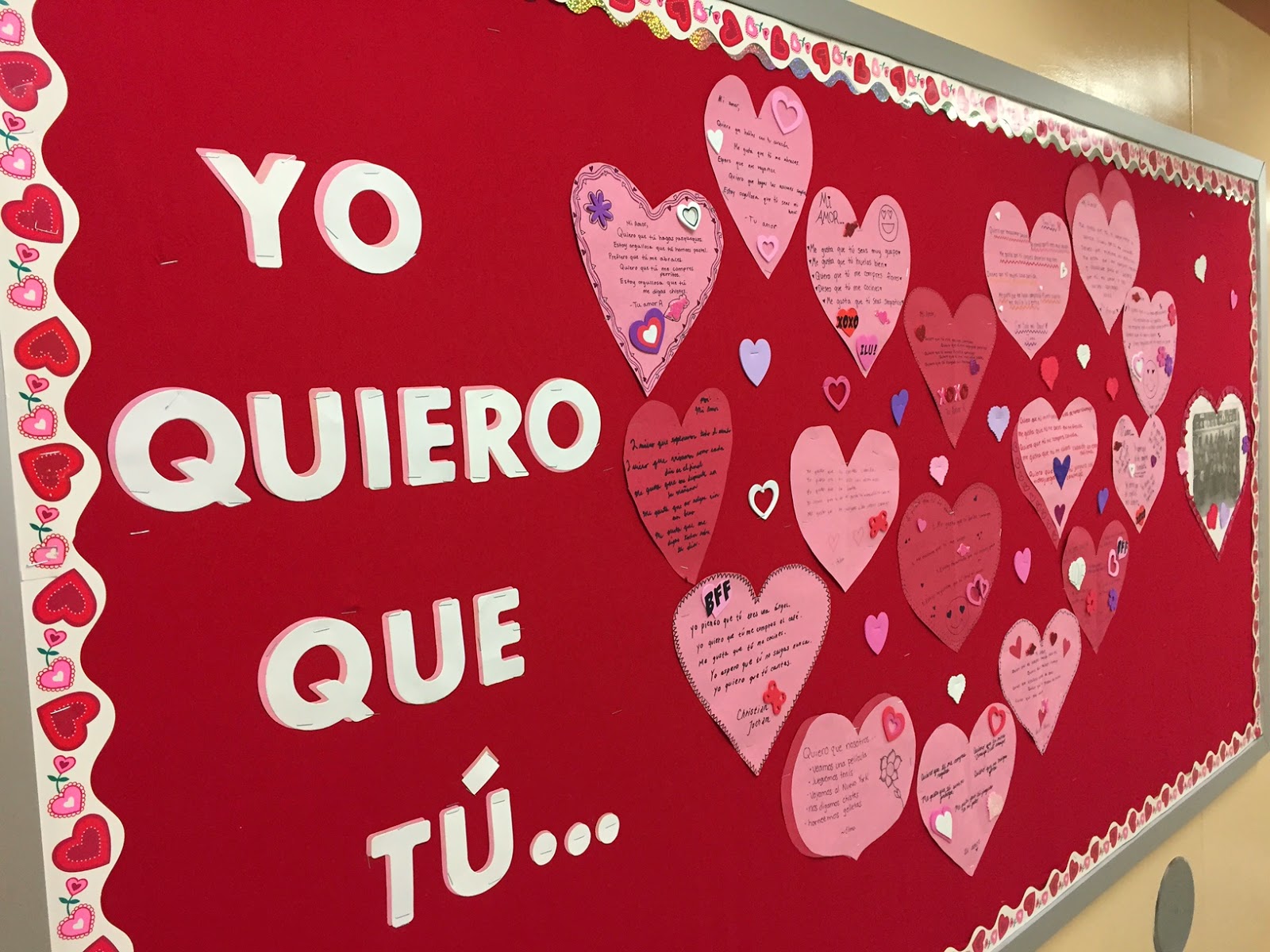
Subjunctive Hearts - in time for Valentine's Day
Valentine's Day will be here in a little over a month. Even though the following activity would be a great one to complete in February, I did the activity with one of my classes on January 9, because the last day of the semester is this Friday, and the following week I'll get new rosters of students.
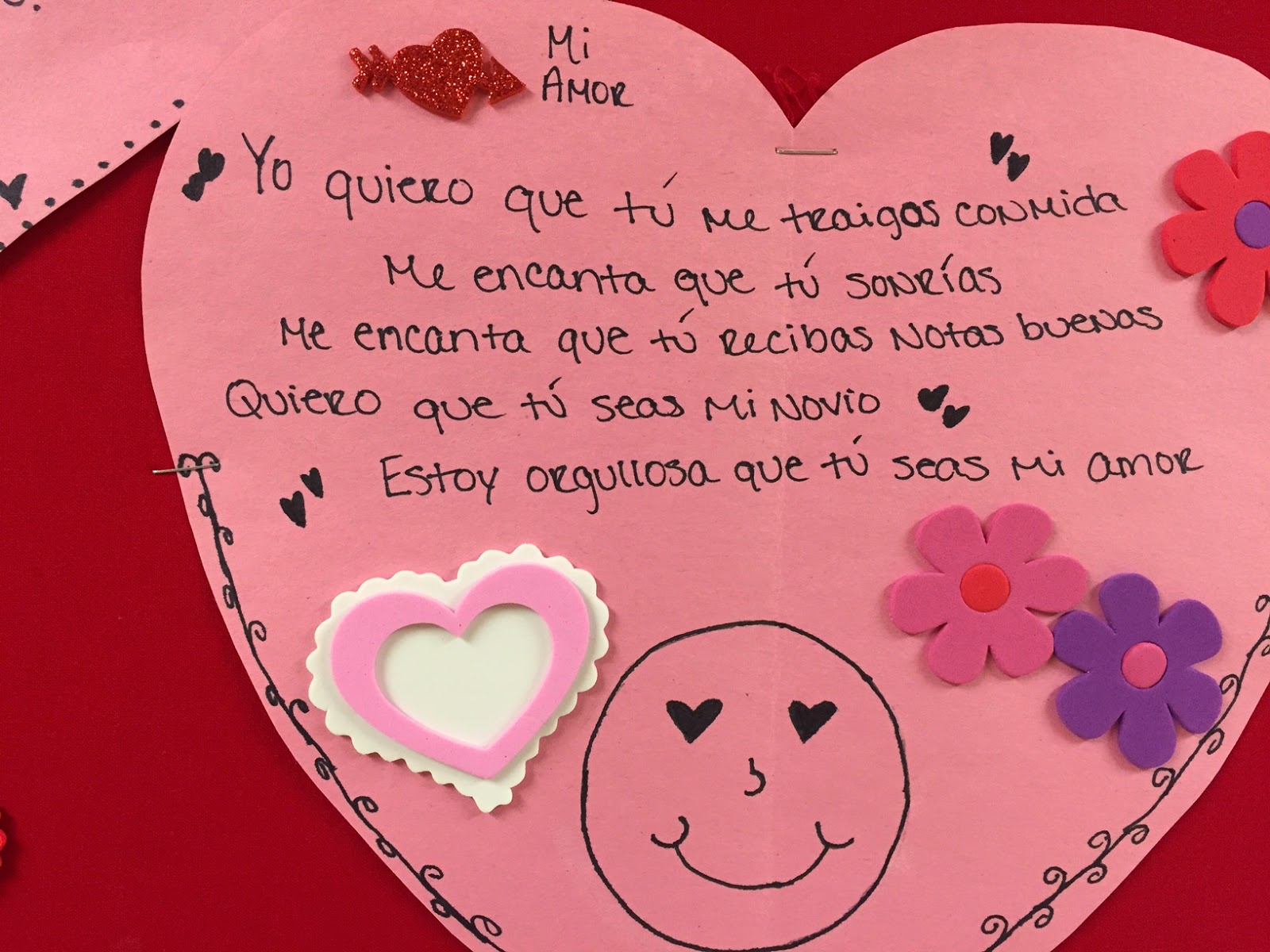
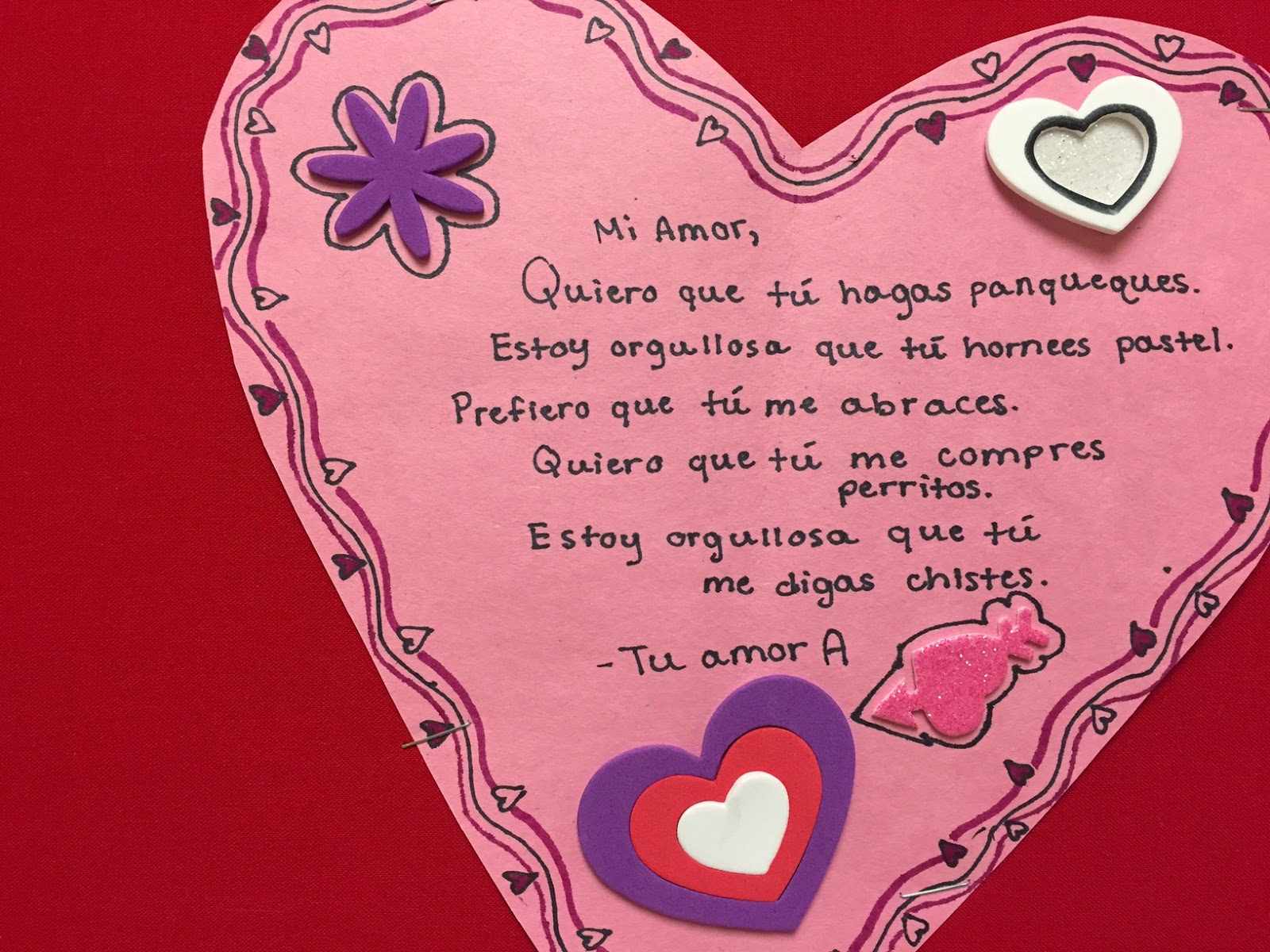
First, my students listened to Victor Muñoz's song, "Mi Princesa". They were familiar with it because I had played it during class changes earlier in the week. After listening to the song one time, I distributed Zachary Jones's cloze activity (found in his Cancionero 2012 book) for them to complete when we listened to the song again. We discussed the lyrics and the multiple examples of the singer wanting someone else to do something - Quiero que tú... (subjunctive indicator) .
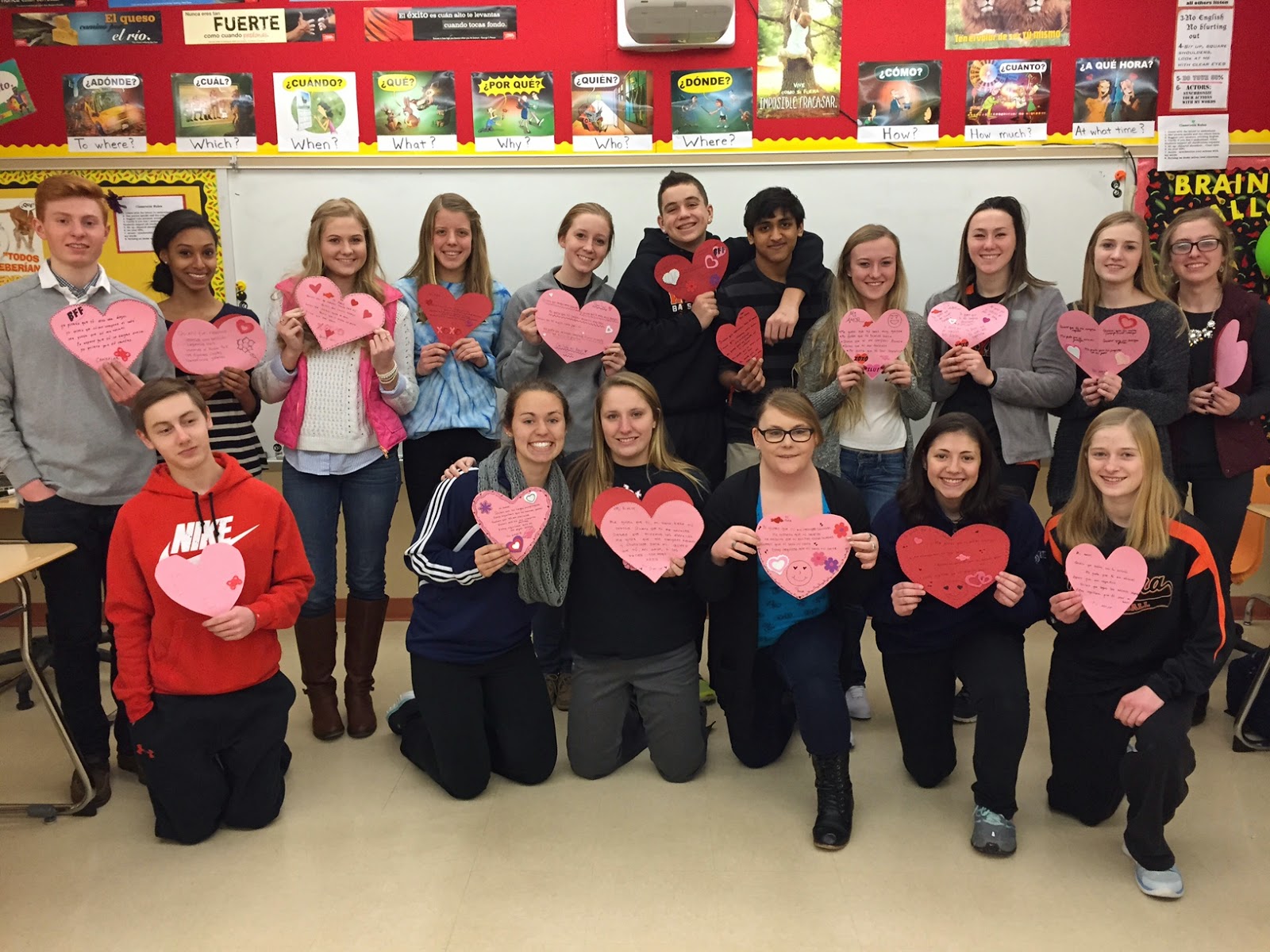
Then the students cut pink and red paper in the shape of hearts, wrote lyrics following the pattern of the song on their hearts, and embellished their hearts with Valentine's shapes.
As a last minute idea, I decided to post the hearts on the bulletin board outside my room. The students helped me to arrange their lyrics hearts in the shape of one big heart. (My high school doesn't have an Ellison die-cut machine so when I have time to stop at the elementary school, I want to replace the temporary letters with some more polished looking ones.)
| Spanish 4 students with their (Subjunctive) Hearts |
Saturday, January 10, 2015
Reading Spanish Novels Inspires Students to Help Others
![]() |
| HALF of the cookies |
After reading the books, the class decided they wanted to help others in those countries. Since it was close to Christmas, and since I love to bake, the option of selling cookies to raise funds was an easy decision.
![]() |
| Adding icing to the oatmeal cookies |
Because there was only one remaining weekend before Christmas and we wanted to distribute the cookies in time for Christmas, only four students were available on Sunday, December 21, to help bake the cookies. But those four students were workers! As soon as they finished one job they asked what else needed to be done. Together we baked oatmeal cookies with cream, raisin-filled cookies, and sugar cookies with icing to add to the chocolate chip cookies I had baked the previous day. The photo at the beginning of the post shows half of the cookies; the chocolate chip cookies are not on the table.
![]() |
| The 100 step Raisin Filled Cookies (well, not quite) |
Before Christmas break, the students had searched the KIVA website, an international micro-lending organization, and selected loan proposals from people in Guatemala and El Salvador. This week I looked at the loan proposals they had suggested and printed out a list of those that were not fully funded yet. There were 7 options so I gave each student 3 post-it notes. They used the post-it notes to vote for the loan they wanted.
We decided to give $100 to 3 different groups.
A. Tejadoras - Guatemala
B. José - El Salvador
C. Saul - El Salvador
This was a fun, educational experience for the students and for me that reached far beyond the classroom walls! Because of the educational value of this project, it is something I want to continue this with my Spanish 4 classes in the next semester and in years to come!
Many THANKS to Kristy Placido and Carrie Toth who have involved their students in several international projects that offer assistance to those in need and who unknowingly inspired me to do the same! (read about Kristy's KIVA post HERE and 1 of Carrie's projects HERE)
Monday, December 15, 2014
A Super Fun Christmas Game
My daughter was looking for ideas for our extended family Christmas get-together and she found THIS GAME. After reading it, I thought, "I can translate the directions to Spanish and use it with my Spanish classes."
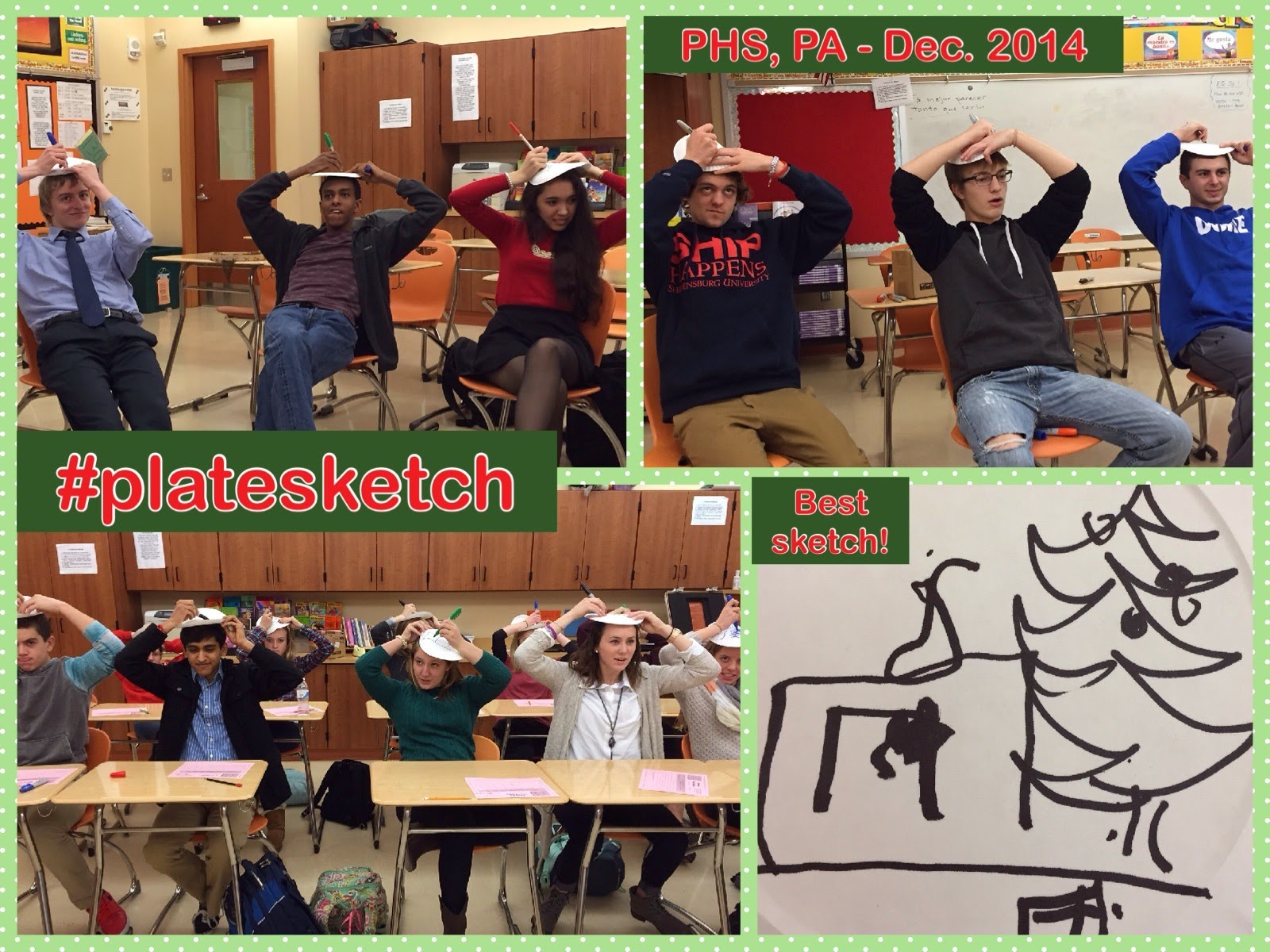
Then I thought, "wouldn't it be fun to ask other MFL teachers if they wanted to complete the activity with 1 (or more) of their classes. If they tweet or email their best sketch to me, I can create a photo collage of the sketches or post photos of their sketches."
I am going to do this activity with all of my Spanish classes this week. I'll probably buy a small prize for the sketch with the most points and/or the best sketch for each class to provide extra motivation for them to concentrate while drawing.
Update: Below are links to two google slides presentations to use with your class:
1. Presentation from 2014 made by Elena Lopez
2. Presentation from 2015 made by Ashley Soriano
Are you interested in joining in?
If so...
1. Complete this activity this week with 1 (or more) of your language classes in your Target Language. Update: @lopezelena saw the tweets about the activity and then created and shared this Google Presentation of the activity - ready to go for Spanish teachers. Thanks Elena.
2. TWEET the best sketch(es) with the hashtag #platesketch or email the sketch(es) to me by Friday afternoon, December 19.
I'll make a collage or use another way to share the sketches on my blog and Twitter.
HERE is the link to the document I shared on Twitter. Let the fun begin!
UPDATED version (as seen below) click HERE
After Christmas I discovered that there were many other #platesketch tweets that I had missed, so I uploaded a second book. Click HERE to view the second book.
Then I thought, "wouldn't it be fun to ask other MFL teachers if they wanted to complete the activity with 1 (or more) of their classes. If they tweet or email their best sketch to me, I can create a photo collage of the sketches or post photos of their sketches."
I am going to do this activity with all of my Spanish classes this week. I'll probably buy a small prize for the sketch with the most points and/or the best sketch for each class to provide extra motivation for them to concentrate while drawing.
Update: Below are links to two google slides presentations to use with your class:
1. Presentation from 2014 made by Elena Lopez
2. Presentation from 2015 made by Ashley Soriano
Are you interested in joining in?
If so...
1. Complete this activity this week with 1 (or more) of your language classes in your Target Language. Update: @lopezelena saw the tweets about the activity and then created and shared this Google Presentation of the activity - ready to go for Spanish teachers. Thanks Elena.
2. TWEET the best sketch(es) with the hashtag #platesketch or email the sketch(es) to me by Friday afternoon, December 19.
I'll make a collage or use another way to share the sketches on my blog and Twitter.
HERE is the link to the document I shared on Twitter. Let the fun begin!
UPDATED version (as seen below) click HERE
After Christmas I discovered that there were many other #platesketch tweets that I had missed, so I uploaded a second book. Click HERE to view the second book.
Photo Collage from Palmyra High School - Dec. 15, 2014
Wednesday, December 3, 2014
I CAN Statements
One regret of attending ACTFL14 is that I was unable to stay for the Sunday morning sessions. I had an early Sunday morning direct flight, (at an unbeatable price), which meant I had to miss the last 1/2 day of the conference.
However, there was one Sunday morning session that I was able to hear BEFORE it was presented on Sunday. It was "Helping Students Navigage the Can-Do Statements" by co-presenters Michele Whaley and Mira Canion.
On Saturday afternoon, Michele Whaley, Krista Applegate, and I were debating which session to attend. After several minutes of searching possibilities, we admitted that we were feeling a bit weary from information overload. It was then that Michele asked if we wanted to help her by listening to a practice run through of her Sunday presentation. Of course I said yes! We found a quiet area and Michele proceeded to deliver her "practice" presentation on I CAN statements. Her presentation was informative and helped me to better appreciate the usefulness of I CAN statements.
I returned home from ACTFL pondering how to incorporate I CAN statements in a way that would be beneficial for my students. In the language department at my school, we don't teach what many refer to as well-defined "units". It's easy to visualize how I CAN statements fit into traditional units, but not as clear for a curriculum based on high-frequency words and structures.
It quickly became evident to me that I CAN statements fit hand-in-hand with Backward Planning or Understanding by Design. (Check Carrie Toth's blog "Somewhere to Share", especially this post, for an explanation.) I looked at what I wanted the students to be able to do and then wrote I CAN statements that matched those goals. After the statements were written, it was easy to align the class activities and stories to match the statements. (Michele Whaley wrote a blog post this week with an example of how she is implementing the I CAN statements with her students. Find it HERE!)
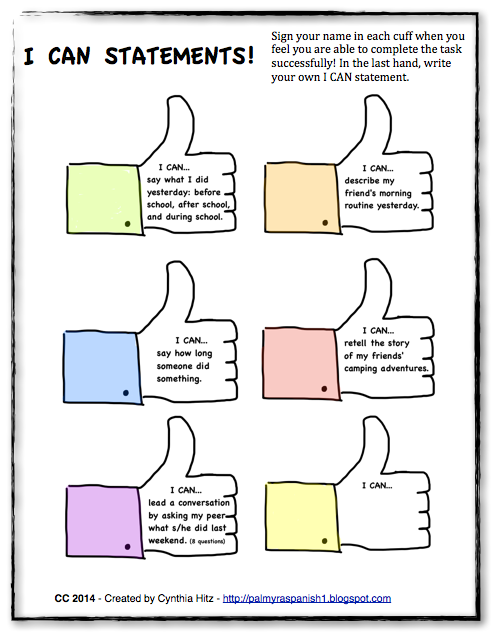
On the first day of school after Thanksgiving break, I greeted my students at the door with the above paper of I CAN statements. Each day I remind them to check the paper and sign any statements they can complete. Today as I circulated through the class as the students were working in groups, I noticed a student's paper with her signature in several cuffs. It was evident to me that students are using the statements to monitor their progress. (Note: The I CAN statements pictured above are guiding the students to pull together what we've been working on for the entire semester as they look ahead to the final exam which is less than 20 instructional days away. My future I CAN statements will be more specific to relate to our "units".)
This is only the beginning! I have ideas bouncing around my head in other ways to use the I CAN statements, and when I have time...(hopefully soon), I'll write additional statements for our "units".
However, there was one Sunday morning session that I was able to hear BEFORE it was presented on Sunday. It was "Helping Students Navigage the Can-Do Statements" by co-presenters Michele Whaley and Mira Canion.
On Saturday afternoon, Michele Whaley, Krista Applegate, and I were debating which session to attend. After several minutes of searching possibilities, we admitted that we were feeling a bit weary from information overload. It was then that Michele asked if we wanted to help her by listening to a practice run through of her Sunday presentation. Of course I said yes! We found a quiet area and Michele proceeded to deliver her "practice" presentation on I CAN statements. Her presentation was informative and helped me to better appreciate the usefulness of I CAN statements.
I returned home from ACTFL pondering how to incorporate I CAN statements in a way that would be beneficial for my students. In the language department at my school, we don't teach what many refer to as well-defined "units". It's easy to visualize how I CAN statements fit into traditional units, but not as clear for a curriculum based on high-frequency words and structures.
It quickly became evident to me that I CAN statements fit hand-in-hand with Backward Planning or Understanding by Design. (Check Carrie Toth's blog "Somewhere to Share", especially this post, for an explanation.) I looked at what I wanted the students to be able to do and then wrote I CAN statements that matched those goals. After the statements were written, it was easy to align the class activities and stories to match the statements. (Michele Whaley wrote a blog post this week with an example of how she is implementing the I CAN statements with her students. Find it HERE!)
On the first day of school after Thanksgiving break, I greeted my students at the door with the above paper of I CAN statements. Each day I remind them to check the paper and sign any statements they can complete. Today as I circulated through the class as the students were working in groups, I noticed a student's paper with her signature in several cuffs. It was evident to me that students are using the statements to monitor their progress. (Note: The I CAN statements pictured above are guiding the students to pull together what we've been working on for the entire semester as they look ahead to the final exam which is less than 20 instructional days away. My future I CAN statements will be more specific to relate to our "units".)
This is only the beginning! I have ideas bouncing around my head in other ways to use the I CAN statements, and when I have time...(hopefully soon), I'll write additional statements for our "units".
Monday, November 24, 2014
Storyasking & Nearpod
Lately, I've been having fun exploring the uses of Nearpod to present the target language in context in a way that engages all students.
What is Nearpod? It is an ipad slide sharing app that enables the teacher to control which slide the students are viewing on their ipads. You can create a new presentation or upload a powerpoint presentation you have on file onto the Nearpod site. The teacher views the presentation from her account on Nearpod as the students view the same presentation on ipads or ipods.
Nearpod goes beyond being a simple powerpoint presentation. There are options to embed quizzes, polls, sketches, matching activities, fill in the blanks, add voice, etc. As the students answer and complete the activities, the teacher can view their answers in real time on her computer screen. Also, there is the ability for the teacher to share the students' answers anonymously with the class. By clicking "share", one student's answer will appear on all the ipad screens.
Below is an explanation and example of one of the Nearpod presentations I created and used with my Spanish 2 classes.
My focus structures were: se durmió, se despertó, and estaba cansado. I wrote a story with a plot that provided opportunities to repeat those structures throughout the story. You can write text directly on the Nearpod slides, but it was too limiting to me, so I wrote the text on a powerpoint slide and uploaded it as an image. I looked for places in the text where I could check for students' comprehension, and places where I wanted the students to add their ideas to the story. Then I added slides in the Nearpod presentation with comprehension questions, polls, questions that required the students to sketch, and a fill in the blank activity to summarize.with questions and polls. I drew some sketches to accompany the story and added the sketches to several of the activity pages on Nearpod.
The title of the story is Pedro se durmió. Below is a screenshot of the first part of my presentation as it appears on my Nearpod account.
To start the presentation, each student had an ipad and I gave them the 5 letter code to enter the Nearpod presentation. As they entered, my screen showed the names of the students. It also showed the number of students that entered the presentation in the top right corner. (If at any time a student leaves the Nearpod presentation to explore the internet, the number changes from green to red to alert the teacher that a student has left the session. The teacher can then click on the icon and see which student is not on task.)
After the students were in the session, the picture of Pedro and the title appeared on their screen. Then I moved to the first slide with text and I told them about Pedro. I used the circling technique to familiarize the students with Pedro's information, along with personalized questions about the students' ages, if they ever went to San Antonio, etc.
Then I swiped to the next slide, which moved the presentation to the next slide on each of the students' ipad screens. This slide had 4 short comprehension questions for them to answer. As they submitted their answers, I quickly saw which students needed more circling and repetitions of the information. Below is a screenshot of an example of what the teacher sees as the students answer. (I took this screenshot for this post, not during the actual presentation with the students.)
The next slide had additional text, followed by a slide that asked students why Pedro was so tired. They typed in their answers and I watched the answers appear on my screen. I told the class about 3 of the options the students had written and I wrote the sentences on the board rather than share the students' screens. (This is a Spanish 2 class and since there were small errors in the answers, I didn't want the students seeing the errors.) I then wanted the students to choose which option they wanted to be part of the story so on the following slide they could choose a, b, or c. Their answers appeared on my screen, and the answer with the highest votes became part of our story.
Below is a screenshot of what the teacher sees when the class completes a poll. (This particular poll below, actually is later in the story.)
I continued the storytelling by reading the text with the students, asking comprehension questions while they had the text on their screens, and asking more personalized questions.
In one part of the story, the students had to sketch what Pedro's two friends did when they saw that he was sleeping. The picture to the right is an example of what a student could draw on their ipad. (I actually drew it to create this blog post). After the students had submitted their work, I was able to view ALL of their sketches and then anonymously shared the student sketches with the students. It provided me material for a LOT of repetitions of verbs in the 3rd person plural.
Below is the teacher's screen that shows 3 student sketches. The teacher can choose all or only a few of the sketches to share with the class to discuss.
If you want to see the full presentation/story, click HERE to see the presentation that I uploaded to my GoogleDrive. (It isn't interactive because it is a powerpoint of the Nearpod presentation.) I took screenshots from the student's view and from my desktop view for the presentation and then added those screenshots onto a powerpoint. It would be much easier to share if/when Nearpod figures out why my Sharing is not functioning in my account.
I have another Nearpod storytelling presentation that I used with another class on "Larry el vampiro". If Nearpod can correct the issue with sharing, I'm willing to share that one through the app email with anyone that is interested.
What is Nearpod? It is an ipad slide sharing app that enables the teacher to control which slide the students are viewing on their ipads. You can create a new presentation or upload a powerpoint presentation you have on file onto the Nearpod site. The teacher views the presentation from her account on Nearpod as the students view the same presentation on ipads or ipods.
Nearpod goes beyond being a simple powerpoint presentation. There are options to embed quizzes, polls, sketches, matching activities, fill in the blanks, add voice, etc. As the students answer and complete the activities, the teacher can view their answers in real time on her computer screen. Also, there is the ability for the teacher to share the students' answers anonymously with the class. By clicking "share", one student's answer will appear on all the ipad screens.
Below is an explanation and example of one of the Nearpod presentations I created and used with my Spanish 2 classes.
My focus structures were: se durmió, se despertó, and estaba cansado. I wrote a story with a plot that provided opportunities to repeat those structures throughout the story. You can write text directly on the Nearpod slides, but it was too limiting to me, so I wrote the text on a powerpoint slide and uploaded it as an image. I looked for places in the text where I could check for students' comprehension, and places where I wanted the students to add their ideas to the story. Then I added slides in the Nearpod presentation with comprehension questions, polls, questions that required the students to sketch, and a fill in the blank activity to summarize.with questions and polls. I drew some sketches to accompany the story and added the sketches to several of the activity pages on Nearpod.
The title of the story is Pedro se durmió. Below is a screenshot of the first part of my presentation as it appears on my Nearpod account.
To start the presentation, each student had an ipad and I gave them the 5 letter code to enter the Nearpod presentation. As they entered, my screen showed the names of the students. It also showed the number of students that entered the presentation in the top right corner. (If at any time a student leaves the Nearpod presentation to explore the internet, the number changes from green to red to alert the teacher that a student has left the session. The teacher can then click on the icon and see which student is not on task.)
After the students were in the session, the picture of Pedro and the title appeared on their screen. Then I moved to the first slide with text and I told them about Pedro. I used the circling technique to familiarize the students with Pedro's information, along with personalized questions about the students' ages, if they ever went to San Antonio, etc.
Then I swiped to the next slide, which moved the presentation to the next slide on each of the students' ipad screens. This slide had 4 short comprehension questions for them to answer. As they submitted their answers, I quickly saw which students needed more circling and repetitions of the information. Below is a screenshot of an example of what the teacher sees as the students answer. (I took this screenshot for this post, not during the actual presentation with the students.)
The next slide had additional text, followed by a slide that asked students why Pedro was so tired. They typed in their answers and I watched the answers appear on my screen. I told the class about 3 of the options the students had written and I wrote the sentences on the board rather than share the students' screens. (This is a Spanish 2 class and since there were small errors in the answers, I didn't want the students seeing the errors.) I then wanted the students to choose which option they wanted to be part of the story so on the following slide they could choose a, b, or c. Their answers appeared on my screen, and the answer with the highest votes became part of our story.
Below is a screenshot of what the teacher sees when the class completes a poll. (This particular poll below, actually is later in the story.)
I continued the storytelling by reading the text with the students, asking comprehension questions while they had the text on their screens, and asking more personalized questions.
In one part of the story, the students had to sketch what Pedro's two friends did when they saw that he was sleeping. The picture to the right is an example of what a student could draw on their ipad. (I actually drew it to create this blog post). After the students had submitted their work, I was able to view ALL of their sketches and then anonymously shared the student sketches with the students. It provided me material for a LOT of repetitions of verbs in the 3rd person plural.
Below is the teacher's screen that shows 3 student sketches. The teacher can choose all or only a few of the sketches to share with the class to discuss.
On the very last slide, I created a fill in the blank activity. Since I wanted the students to read, yet one more time, the target structures, I DID NOT choose those words for the students to fill in the blanks. I chose words close to the target structures so the students had to read the target structures in order to figure out which word in the word bank at the bottom of the page was the best choice.
The following day in class, we reviewed the story that the class had helped me to create. Then I distributed a copy of my original story and we read it together. For an additional reading, I had the students form a diagonal line from one corner of the classroom to another. They paired up with another student and their task was to read the story in English. When I told students to change, one student had to move to the right, and the person at the end of the line went to the front of the line. Students continued reading with their new partner. While they were busy doing that, I placed a paper with questions related to the reading on their desks. I sent them to their desks to complete the questions. After all of the readings and work with the text the previous day, the comprehension and short answer questions were a cinch for the students to complete.
I used the Pedro se durmió story with two classes. After we finished, I asked for student feedback. They said they enjoyed helping to create the story with Nearpod.
Advantages of using Nearpod in connection with storyasking/storytelling:
- All students participated
- Instant feedback on which students understood the story and which students needed additional circling and repetition. I didn't have to specifically call on students to find this out since ALL answered the comprehension questions.
- It is easy to return to earlier slides when more repetition is needed.
- Students really wanted to see ALL their classmates' sketches. This meant they heard a LOT of examples of verbs in the 3rd person plural.
- It kept the students actively engaged. There was not much time for them to "zone out".
- Quiet students were engaged.
- I liked the ability to share answers anonymously. If I wanted to share a sentence that was incorrect, I could ask students what they would do differently, but none of the students would know who had written the sentence that was being shared.
Disadvantages to Nearpod
- I STILL...haven't been able to receive help from the Nearpod staff on why I am unable to share the presentation. (frustrating) Update: I found a way to share the interactive presentation that is on my Nearpod account. If you want to view it and have a copy of it, send me your email (in comments below or a direct message through Twitter if you don't want to make your email public) and I will email it to you. You need a basic free account with Nearpod in order to access the presentation.OR...try the following link (you must have a basic nearpod account to open it).
open this link.
- It takes more time to prepare for a story than regular storytelling.
- We are not a 1:1 school, so I need to plan ahead to ensure that I have access to the ipads on a particular day.
- There is a limit to how many presentationsyou can save to the Nearpod account. If you have the free basic level (silver level), only 30 students can log into Nearpod at one time.
- You need an internet connection.
- Technology, overall, diminishes that one-to-one interaction.
Overall, I liked trying something new for storyasking/storytelling. I will
probably use Nearpod for this type of activity 2- 3x/semester (1 semester = 90 days). I don't want to overuse it or the novelty will wear off quickly.
![]() |
| Another story uploaded to Nearpod |
I have another Nearpod storytelling presentation that I used with another class on "Larry el vampiro". If Nearpod can correct the issue with sharing, I'm willing to share that one through the app email with anyone that is interested.
The above is an example for storyasking/storytelling. Nearpod has MANY other uses which I am interested in seeing and hearing how other MFL teachers have incorporated it into their classes.
Subscribe to:
Posts (Atom)